WOPET HV10P / HV10DP User Manual
← All user manuals · HV10P support · HV10DP support
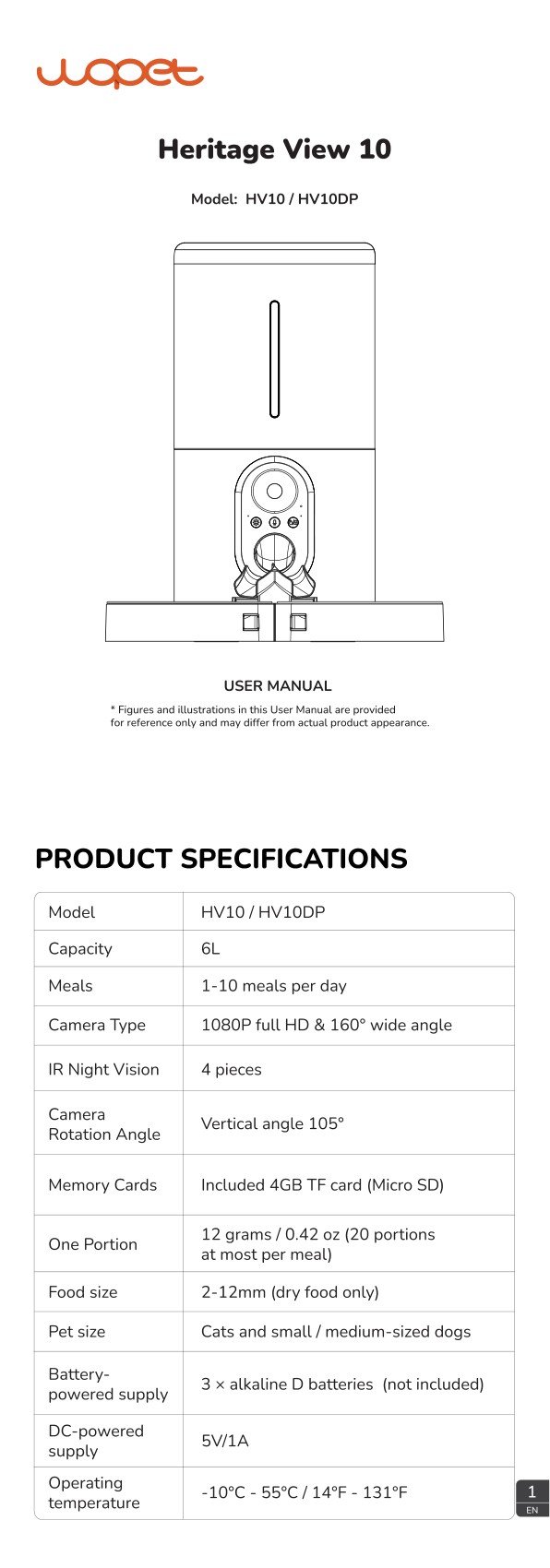
This user manual applies to both WOPET HV10P and HV10DP. The original document is titled Heritage View 10 and labels the product family HV10 / HV10DP.
Read this web edition in English. Open or download the original PDF for the original document and any additional languages. Check the model, hardware revision and supplied instructions before use.
On this page
- Specifications
- Assembly and power
- Control panel and indicators
- App setup
- Cleaning and maintenance
- Feeding and connection troubleshooting
- Camera, recording and audio
- Warranty and help
- Original diagrams and PDF
- Related help
Specifications
| Item | Manual specification |
|---|---|
| Applicable models | HV10P / HV10DP |
| Product family printed in PDF | HV10 / HV10DP |
| Capacity stated in PDF | 6L |
| Meals stated in this edition | 1–10 per day |
| Portion stated in this edition | 12g / 0.42oz; up to 20 portions per meal |
| Dry food size | 2–12mm |
| Camera | 1080p; 160° wide angle; 105° vertical rotation |
| Power | 5V / 1A; three alkaline D backup batteries |
| Memory card | 4–256GB; Class 10 or above |
Assembly and power
- Open the cover and put the desiccant in its compartment. Follow the bowl assembly drawing that matches the parts supplied with your unit; the source drawing illustrates the dual-bowl configuration.
- For recording, insert a compatible TF / MicroSD card into the slot inside the battery-compartment area. Follow the insertion direction; do not force it. Push lightly to release it.
- The manual states a 4GB card is included, supports 4–256GB Class 10 or faster cards and advises formatting before first use.
- Install three D-type alkaline batteries and connect the Type-C power cable. The manual recommends using external power with backup batteries.
- Batteries are backup power only. App operations and network pairing are unavailable in battery-only mode.
Control panel and indicators
- Hold Unlock / Manual Feed for 2 seconds to lock or unlock. In the unlocked state, press to dispense one portion.
- In the unlocked state, hold Record to record up to 10 seconds; release to stop. Two beeps confirm saving.
- Settings / Reset: hold for 5 seconds until the indicator flashes to restore factory settings. Resetting changes the device setup; check schedules afterward.
- Status light: green indicates feeding is functioning; red indicates a motor jam or another fault. Wi-Fi light: steady green indicates a normal network; red indicates a failed connection.
App setup
- Download WOpet Life using the manual’s QR code or the Apple App Store / Google Play. Log in or register an account.
- Enable Bluetooth and the setup permissions described by the app. Tap Set Up Device and choose the detected feeder; if it is not found, select the device manually.
- This manual supports 2.4GHz and 5GHz Wi-Fi. Keep the feeder within approximately 6m / 19.7ft of the router without obstructions for setup.
- Pair with external power connected. Follow the current app prompts, since its interface may change.
Cleaning and maintenance
- Disconnect power before cleaning. Remove the stainless-steel bowls; this model’s manual permits rinsing them or cleaning the bowls in a dishwasher.
- Open the top cover and remove the desiccant before cleaning the hopper.
- Rotate the hopper counterclockwise and lift it out. Rotate the turnplate counterclockwise to remove it.
- After cleaning, reinstall the turnplate and turn it clockwise to secure it. The permission to wash removable bowls does not apply to the electrical base.
Feeding and connection troubleshooting
- Cannot connect: check the supported Wi-Fi band, external power, account and password. Battery-only mode does not support app operations.
- Offline: check router distance and obstructions. Use the documented reset only when needed, then verify the setup and feeding schedule.
- Panel buttons do not respond: hold Unlock for 2 seconds to exit the child lock.
- No food dispensed: check power, an overfilled bowl, an empty hopper, a jammed rotor and food size. Use dry food within 2–12mm; disconnect power before clearing a jam.
- The manual notes that the first serving after adding food can be smaller. Observe actual delivery; its stated grams per portion do not replace checking your own kibble and feeding plan.
Camera, recording and audio
- For no video or no camera movement, check for a covered lens, app privacy settings and network connectivity.
- For echo during a call, move the phone and feeder into separate rooms or areas.
- For weak audio, check app speaker and microphone settings, privacy permissions and network status. The manual describes best pickup within approximately 1m of the feeder.
Warranty and help
- The manual lists a standard one-year warranty and a two-year registration application within 30 days of receipt, plus 30-day return and replacement information. Eligibility depends on the purchase and terms in the original document.
- Complimentary parts, replacements and consumables are excluded from the stated two-year warranty. Email support@wopet.com with proof of purchase and the model label.
- For Amazon orders: Your Orders → View order details → Seller name → Ask a question.
Regulatory notices
The source manual includes FCC Class B / Part 15 notices. Unauthorized changes or modifications can void authority to operate the equipment. The document notes that interference can still occur in a particular installation.
- If interference occurs, the manual lists reorienting or relocating the receiving antenna, increasing separation from the receiver, using an outlet on a different circuit, or consulting a dealer or radio / TV technician.
- Use the original PDF for the full compliance notice, including any cable and antenna requirements. Specifications and illustrations may change between revisions.
Original diagrams and PDF
Open or download the original HV10P / HV10DP manual (PDF)
Related help
HV10P product support and related guides · HV10DP product support and related guides · Help Center · All user manuals