WOPET W600 Plus User Manual
← All user manuals · Product support
The linked PDF is titled “Basin Water Fountain W600.” It is the document linked from the W600 Plus support page. Match its pump and controls to your unit before use.
Read this web edition in English. Open or download the original PDF for the original document and any additional languages. Check the model, hardware revision and supplied instructions before use.
On this page
- Specifications
- Safety and important reminders
- Parts and assembly
- Indicator lights
- Cleaning and filter replacement
- Troubleshooting
- Warranty and claims
- Original diagrams and PDF
- Related help
Specifications
| Item | Manual specification |
|---|---|
| Capacity | 6L |
| Power input | DC 5V / 1A |
| Rated consumption in manual | 1.5W |
| Cord length | 1.8m |
| Material | ABS |
Safety and important reminders
- Use indoors only. Keep the plug and outlet dry, and position the power adapter above the fountain.
- Keep water in the tank whenever the pump is running. Disconnect power before adding or removing parts, cleaning or servicing the fountain.
- Inspect the cord for frayed or exposed wires. Prevent pets from chewing the cord. Do not use a damaged appliance.
- If the fountain suddenly becomes noisy, check for a low water level. Add water within the indicated range before restarting.
Parts and assembly
- The manual identifies the bowl, top cover, spout, gentle fountain outlet, filter cover, filter, DC pump and pump housing groove.
- Fit the pump into its slot and press down so the suction cups hold it securely.
- Prepare the activated-carbon filter in a separate clean bowl: soak for 5 minutes, then rinse for 30 seconds. Fully wet the filter before operation; do not soak it inside the fountain tank.
- Place the filter in the pump housing groove and close it. Refit the top cover to form the seal shown in the original drawing.
- Fill without exceeding the maximum mark. Keep the USB connection dry, connect the specified power supply and observe the first run.
Indicator lights
- The manual describes a blue light during operation and a red light when water is low. Refill when the low-water indication appears; never test the pump by running it dry.
Cleaning and filter replacement
- Disconnect the power supply before maintenance. Clean the fountain at least every two weeks, and inspect it between scheduled cleans.
- Clean the pump every two weeks: remove the pump cover and impeller cover, remove the impeller, and clean the parts with soap and warm water as shown in the manual. Rinse and reassemble correctly.
- Keep the adapter and electrical plug out of water. The manual’s pump-cleaning instructions do not make the adapter washable.
- Replace the filter every 2–3 weeks in the conditions described by this manual. Multiple pets and heavier debris may require more frequent changes.
Troubleshooting
- Small black particles can be residual carbon from a new filter. Rinse the filter thoroughly before installation; investigate ongoing dirt or residue rather than repeatedly topping up water.
- For weak flow or unusual noise, check water level, filter preparation, pump cleanliness and correct reassembly.
- The manual gives a typical pump-life estimate of 2–3 years. This is not a guaranteed replacement interval; contact support if correct cleaning does not restore operation.
- The manual estimates 1.08kWh per month and 12.96kWh per year from a 1.5W rating. Actual use depends on operating time and conditions.
Warranty and claims
- This edition contains both a two-year limited-warranty section and a standard one-year warranty with a two-year registration application. Confirm the terms for your purchase with the seller rather than assuming all purchases have the same coverage.
- Keep proof of purchase. The manual lists defects under proper use and missing parts as claim categories; exclusions include abnormal use, accidental damage, purchases outside the stated sales channels, gifts without proof of purchase, replacement parts and labor.
- Contact support@wopet.com with your order details. For an Amazon purchase: Your Orders → View order details → Seller name → Ask a question.
Original diagrams and PDF
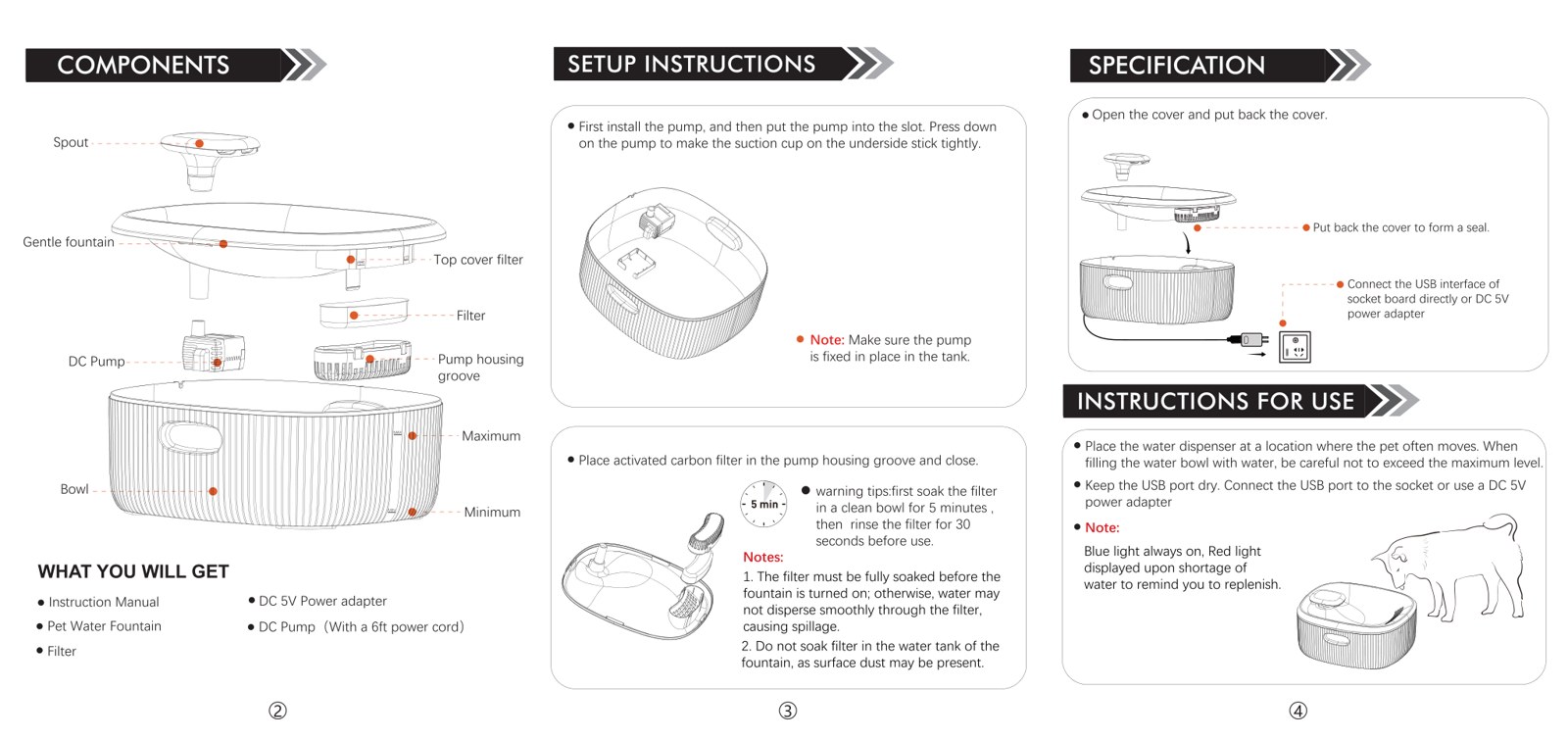
Open or download the original W600 Plus manual (PDF)
Related help
W600 Plus product support and related guides · Help Center · All user manuals
Step-by-step video guides: Assemble the W600 Plus Basin fountain · Take apart and clean the W600 Plus Basin fountain