WOPET W600 Pro User Manual
← All user manuals · Product support
Cordless 6L pet water fountain. This web edition uses the W600 Pro PDF supplied in November 2026, not the wired W600 / W600 Plus document.
Read this web edition in English. Open or download the original PDF for the original document and any additional languages. Check the model, hardware revision and supplied instructions before use.
On this page
- Specifications
- Safety instructions
- Parts and first setup
- Power and flow modes
- Button and display
- Filter and pump maintenance
- Troubleshooting
- Warranty and support
- Original diagrams and PDF
- Related help
Specifications
| Item | Manual specification |
|---|---|
| Capacity | 6L |
| Power input | DC 5V / 1A |
| Rated power | 1.5W |
| Battery | 5000mAh Li-ion pack |
| Material | ABS |
| Induction cycle | 20 seconds; continuous mode requires external power |
Safety instructions
- Use a compliant DC 5V / 1A adapter and WOPET-recommended accessories. Do not put foreign objects in the tank.
- Use indoors only. Do not operate without water, in freezing conditions or with damaged components.
- Disconnect power before removing or cleaning parts. Keep the adapter and plug dry. Never pull the cord to unplug. If the plug becomes wet, turn off power to the outlet before handling it.
- Do not let pets chew or swallow components. Do not dismantle the battery base or attempt electrical repairs; contact support@wopet.com.
Parts and first setup
- Identify the bowl, top cover, filter, filter cover, pump, pump plug, USB-C charging port and on/off switch in the original drawing.
- Soak the activated-carbon filter in a separate clean bowl for 5 minutes, then rinse it for 30 seconds. Fully wet it before operation to help avoid restricted flow or spillage.
- Fit the prepared filter in its housing and close the cover. Insert the pump into the fountain base and reassemble as illustrated.
- Add water within the marked operating range. Connect the specified power supply with dry connections. Fully charge before first cordless use.
Power and flow modes
- External power mode uses a connected cable. Battery mode permits cordless indoor use.
- Regular mode provides continuous flow only when external power is connected. It is not available in battery-only mode and cannot be enabled there by pressing the button.
- Induction mode dispenses for 20 seconds when activity is detected.
- This manual lists a 120° sensing angle, approximately 1m in front and 20–50cm on each side. These are the W600 Pro figures, not the W03 sensing specifications.
Button and display
- Hold the on/off button for 3 seconds to power on; hold again for 3 seconds to shut down.
- The digital display shows the current battery percentage. A red battery warning indicates low charge.
- The manual identifies a red pump indication with insufficient water. Refill before restarting.
Filter and pump maintenance
- Replace the filter every 2–3 weeks in the stated conditions. The manual recommends every two weeks when multiple pets share the fountain.
- Clean the pump every two weeks. Shut down and disconnect power first.
- Remove the pump cover and impeller cover in sequence and follow the source drawing for access. Keep the rechargeable base and electrical connections dry. Reassemble before restarting.
Troubleshooting
- Cannot charge: check the compliant 5V supply, USB-C cable and adapter connection. Do not open the base or battery.
- Stops after 20 seconds: this can be normal induction-mode operation.
- Continuous flow when connected to an adapter: check regular-mode operation.
- No flow with the pump’s red indicator: check and restore the required water level.
- Slow flow after first use or long storage can occur while the pump clears air. Also inspect dirt in the pump and follow the cleaning procedure.
- For black residue, replace the water with clean water and rinse the filter before installation. Contact support if a fault persists.
Warranty and support
- The PDF lists 30-day return and replacement information, a standard one-year product warranty and an application for two-year coverage through registration within 30 days of receipt.
- Confirm the conditions applying to your purchase with support@wopet.com. Keep the model label and proof of purchase available.
Regulatory notices
The source manual includes FCC Class B / Part 15 notices. Unauthorized changes or modifications can void authority to operate the equipment. The document notes that interference can still occur in a particular installation.
- If interference occurs, the manual lists reorienting or relocating the receiving antenna, increasing separation from the receiver, using an outlet on a different circuit, or consulting a dealer or radio / TV technician.
- Use the original PDF for the full compliance notice, including any cable and antenna requirements. Specifications and illustrations may change between revisions.
Original diagrams and PDF
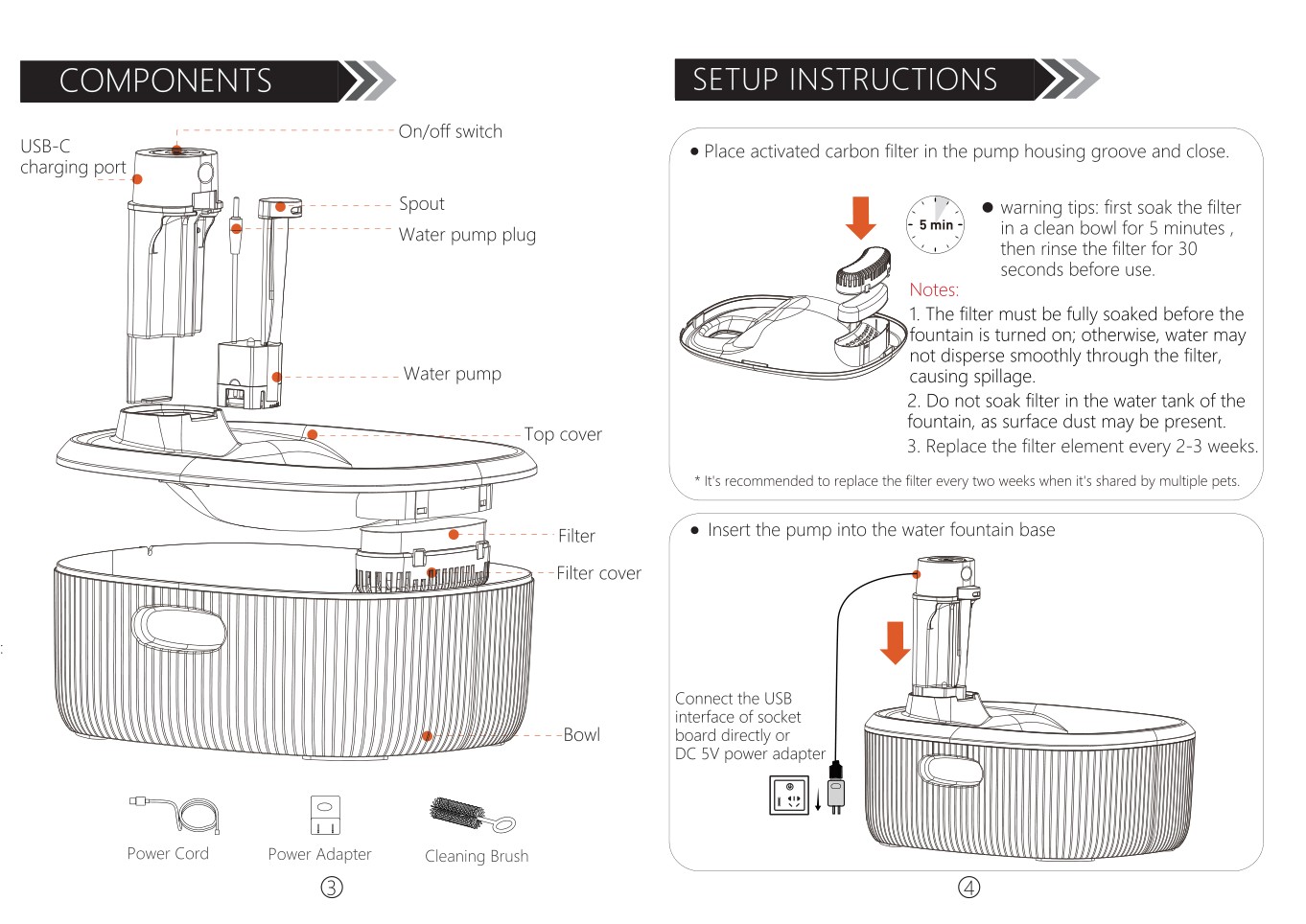
Open or download the original W600 Pro manual (PDF)
Related help
W600 Pro product support and related guides · Help Center · All user manuals