WOPET CA10 User Manual
← All user manuals · Product support
Cube Air 10 user manual. This PDF edition supports 2.4GHz Wi-Fi only; do not assume 5GHz support from another model or listing.
Read this web edition in English. Open or download the original PDF for the original document and any additional languages. Check the model, hardware revision and supplied instructions before use.
On this page
- Specifications
- Assembly
- Buttons and indicator lights
- WOpet Life app setup
- Cleaning the hopper
- Troubleshooting
- Warranty and support
- Original diagrams and PDF
- Related help
Specifications
| Item | Manual specification |
|---|---|
| Capacity | 4L |
| Meals | Up to 10 per day |
| Portion stated in manual | 10g / 0.35oz; up to 8 portions per meal |
| Dry food size | 2–12mm |
| Power | 5V / 1A; three alkaline D backup batteries |
| Dimensions | 18 × 18 × 20.4cm / 7.1 × 7.1 × 8.0in |
Assembly
- Take the bowl out, lift the hopper and remove the packed cable, desiccant and other accessories.
- Open the desiccant cap, put the bag in its compartment and close the cap.
- Open the battery cover and install three D-type alkaline batteries in the indicated orientation. Connect the Type-C power cable, route it through the cable slot and close the cover.
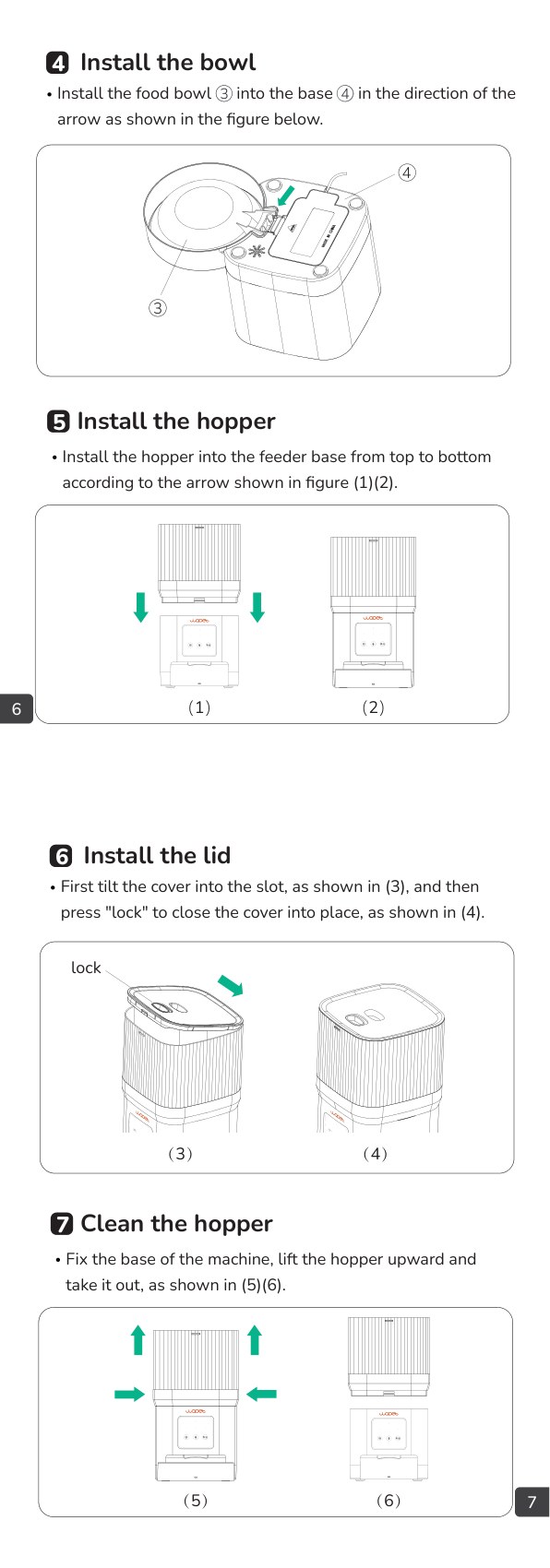
- Install the bowl into the base, lower the hopper into position, then tilt the lid into its slot and press Lock to close.
- The manual recommends dual power. It warns that the machine resets and clears data after 48 hours without power; recheck the feeding setup following a prolonged outage.
Buttons and indicator lights
- Unlock / Manual Feed: hold for 2 seconds to lock or unlock. In the unlocked state, click to dispense one portion.
- Record: hold in the unlocked state for up to 10 seconds; release to stop. Two beeps confirm saving.
- Reset: hold for 5 seconds until the indicator flashes to restore factory settings.
- Status light: green indicates normal feeding; red indicates a stuck motor or another failure. Network light: steady green indicates a normal network; red indicates a failed connection.
- Network pairing requires external power. Batteries are backup only, and app operations are unavailable in battery mode.
WOpet Life app setup
- Install WOpet Life from the app store or the QR code in the original PDF. Register an account or log in.
- Enable Bluetooth and location services needed for setup. Tap Set Up Device, select the detected feeder and follow the prompts; manually select the model if it is not found.
- This edition supports only 2.4GHz Wi-Fi. The manual recommends keeping the device within 6m / 19.7ft of the router without walls or objects obstructing it.
- Use external power for pairing. The app interface may change; follow its current on-screen instructions.
Cleaning the hopper
- Disconnect power before handling the dispensing parts. Hold the base steady, lift the hopper upward and remove it as shown in the manual.
- Keep the electrical base dry. Refit the hopper, bowl and lid securely before restarting. Use the original drawing to check the turnplate and component positions.
Troubleshooting
- Cannot connect: check the 2.4GHz network, power, correct credentials and whether the feeder is on battery backup. Follow the documented reset if required.
- Offline: check the router distance and signal obstructions before resetting.
- Panel buttons do not work: hold Unlock for 2 seconds to leave child-lock mode.
- No dispensing: check power, battery condition, an overfilled bowl, an empty hopper, a jammed turnplate and food size. Only use dry food within 2–12mm.
- Disconnect power before clearing food from the dispensing tunnel or turnplate. Reassemble before testing.
- The manual notes that early servings after adding food may be smaller. Check the actual amount delivered with your kibble rather than assuming every portion weighs exactly the listed figure.
- Batteries are a backup source, not the primary power arrangement for connected features.
Warranty and support
- The PDF lists a standard one-year product warranty, a two-year registration application within 30 days of receipt and 30-day return and replacement information. Confirm the conditions applying to your purchase.
- Complimentary parts, replacements and consumables are excluded from the stated two-year coverage. Contact support@wopet.com with the model, order details and problem.
- For Amazon orders: Your Orders → View order details → Seller name → Ask a question.
Regulatory notices
The source manual includes FCC Class B / Part 15 notices. Unauthorized changes or modifications can void authority to operate the equipment. The document notes that interference can still occur in a particular installation.
- If interference occurs, the manual lists reorienting or relocating the receiving antenna, increasing separation from the receiver, using an outlet on a different circuit, or consulting a dealer or radio / TV technician.
- Use the original PDF for the full compliance notice, including any cable and antenna requirements. Specifications and illustrations may change between revisions.
Original diagrams and PDF
Open or download the original CA10 manual (PDF)
Related help
CA10 product support and related guides · Help Center · All user manuals